

seata1.5.1安装(nacos作为注册以及配置中心,mysql8作为存储中心)
前面文章讲过SpringCloudAlibaba之Seata之文章,好多配置出现问题
seata下载地址: seata1.5.1
解压
安装到D盘,随便你辣
配置
seata服务端配置 D:/seata-1.5.1/conf/application.yml
server:
  port: 7091

spring:
  application:
    name: seata-server

logging:
  config: classpath:logback-spring.xml
  file:
    path: ${user.home}/logs/seata
  extend:
    logstash-appender:
      destination: 127.0.0.1:4560
    kafka-appender:
      bootstrap-servers: 127.0.0.1:9092
      topic: logback_to_logstash

console:
  user:
    username: seata
    password: seata

seata:
  config:
    # support: nacos, consul, apollo, zk, etcd3
    type: nacos
    nacos:
      server-addr: 127.0.0.1:8848
      namespace:
      group: SEATA_GROUP
      username: nacos
      password: nacos
      ##if use MSE Nacos with auth, mutex with username/password attribute
      #access-key: ""
      #secret-key: ""
      data-id: seataServer.properties
  registry:
    # support: nacos, eureka, redis, zk, consul, etcd3, sofa
    type: nacos
    nacos:
      application: seata-server
      server-addr: 127.0.0.1:8848
      group: SEATA_GROUP
      namespace:
      cluster: default
      username: nacos
      password: nacos
# 以下存储配置,可以配置在nacos的seataServer.properties
#  store:
    # support: file 、 db 、 redis
#    mode: db
#    db:
#      datasource: druid
#      db-type: mysql
#      driver-class-name: com.mysql.cj.jdbc.Driver
#      url: jdbc:mysql://127.0.0.1:3306/seata?rewriteBatchedStatements=true
#      user: root
#      password: admin
#      min-conn: 5
#      max-conn: 100
#      global-table: global_table
#      branch-table: branch_table
#      lock-table: lock_table
#      distributed-lock-table: distributed_lock
#      query-limit: 100
#      max-wait: 5000
#  server:
#    service-port: 8091 #If not configured, the default is '${server.port} + 1000'
  security:
    secretKey: SeataSecretKey0c382ef121d778043159209298fd40bf3850a017
    tokenValidityInMilliseconds: 1800000
    ignore:
      urls: /,/**/*.css,/**/*.js,/**/*.html,/**/*.map,/**/*.svg,/**/*.png,/**/*.ico,/console-fe/public/**,/api/v1/auth/login
nacos配置
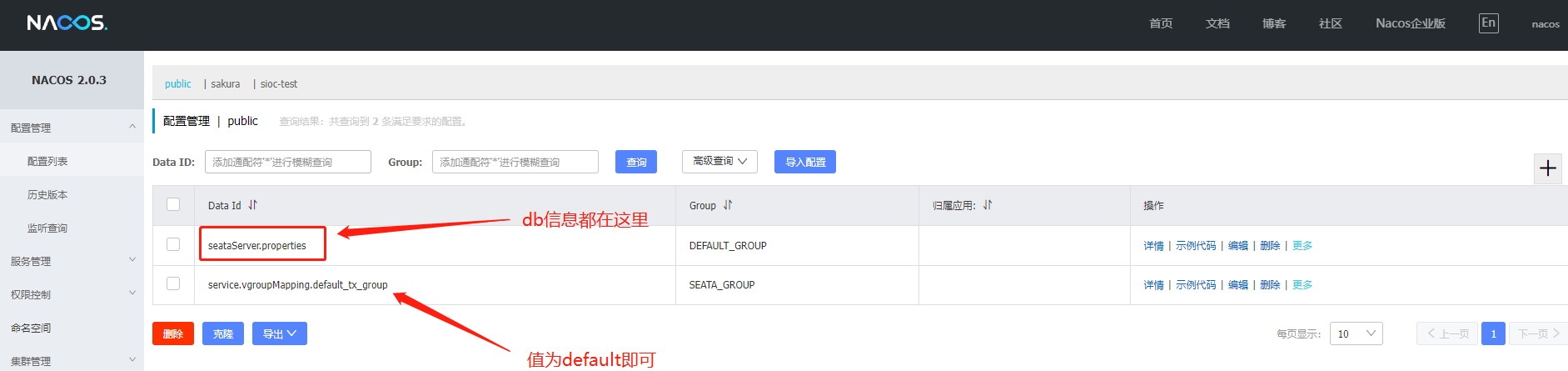
seataServer.properties
store.mode=db
store.db.datasource=druid
store.db.dbType=mysql
store.db.driverClassName=com.mysql.cj.jdbc.Driver
store.db.url=jdbc:mysql://127.0.0.1:3306/seata?useUnicode=true&rewriteBatchedStatements=true
store.db.user=root
store.db.password=admin
store.db.minConn=5
store.db.maxConn=30
store.db.globalTable=global_table
store.db.branchTable=branch_table
store.db.distributedLockTable=distributed_lock
store.db.queryLimit=100
store.db.lockTable=lock_table
store.db.maxWait=5000
springcloudalibaba里配置
#分布式事务配置
seata:
  application-id: ${spring.application.name}
  enabled: true
  enable-auto-data-source-proxy: true
  #分组名称
  tx-service-group: default_tx_group
  #服务配置
  service:
    disable-global-transaction: false
    vgroup-mapping:
      my_test_tx_group: default
    grouplist:
      default: localhost:8091
  #配置中心配置
  config:
    type: nacos
    nacos:
      application: seata-server
      namespace: cloud-demo
      serverAddr: localhost:8848
      group: SEATA_GROUP
  #注册中心配置
  registry:
    type: nacos
    nacos:
      application: seata-server
      namespace: cloud-demo
      server-addr: localhost:8848
      group: SEATA_GROUP
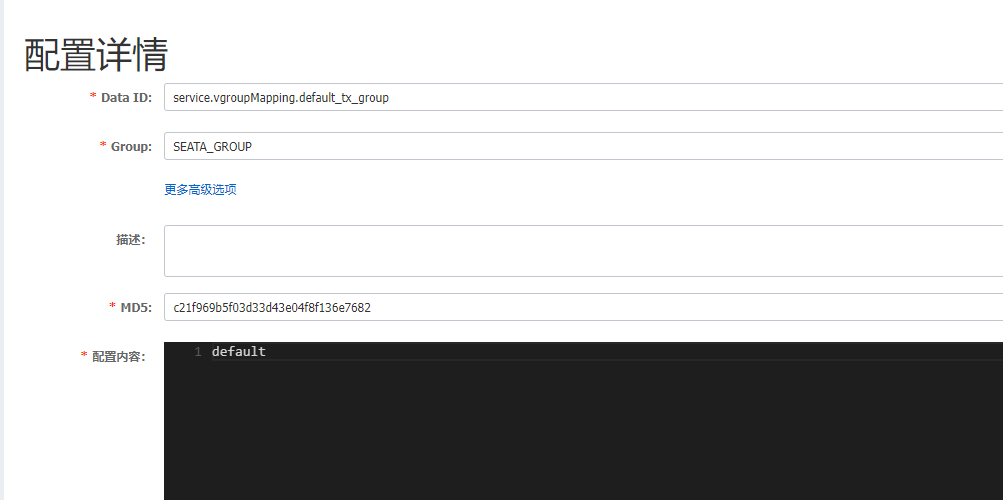
service.vgroupMapping.default_tx_group,值为default。default_tx_group名称要与分布式事务配置tx-service-group的分组名称一致,其余如namespace,group也要一致,如果不新建这个文件,客户端启动,控制台会报错can not get cluster name in registry config ‘service.vgroupMapping.default_tx_group’, please make sure registry config correct
初始化数据库
新建数据库seata,字符集为utf8mb4
增加distributed_lock表用于seata-server异步任务调度 升级1.5.0前,请注意表结构变更,表结构详情请点击此处
-- -------------------------------- The script used when storeMode is 'db' --------------------------------
-- the table to store GlobalSession data
CREATE TABLE IF NOT EXISTS `global_table`
(
    `xid`                       VARCHAR(128) NOT NULL,
    `transaction_id`            BIGINT,
    `status`                    TINYINT      NOT NULL,
    `application_id`            VARCHAR(32),
    `transaction_service_group` VARCHAR(32),
    `transaction_name`          VARCHAR(128),
    `timeout`                   INT,
    `begin_time`                BIGINT,
    `application_data`          VARCHAR(2000),
    `gmt_create`                DATETIME,
    `gmt_modified`              DATETIME,
    PRIMARY KEY (`xid`),
    KEY `idx_status_gmt_modified` (`status` , `gmt_modified`),
    KEY `idx_transaction_id` (`transaction_id`)
) ENGINE = InnoDB
  DEFAULT CHARSET = utf8mb4;

-- the table to store BranchSession data
CREATE TABLE IF NOT EXISTS `branch_table`
(
    `branch_id`         BIGINT       NOT NULL,
    `xid`               VARCHAR(128) NOT NULL,
    `transaction_id`    BIGINT,
    `resource_group_id` VARCHAR(32),
    `resource_id`       VARCHAR(256),
    `branch_type`       VARCHAR(8),
    `status`            TINYINT,
    `client_id`         VARCHAR(64),
    `application_data`  VARCHAR(2000),
    `gmt_create`        DATETIME(6),
    `gmt_modified`      DATETIME(6),
    PRIMARY KEY (`branch_id`),
    KEY `idx_xid` (`xid`)
) ENGINE = InnoDB
  DEFAULT CHARSET = utf8mb4;

-- the table to store lock data
CREATE TABLE IF NOT EXISTS `lock_table`
(
    `row_key`        VARCHAR(128) NOT NULL,
    `xid`            VARCHAR(128),
    `transaction_id` BIGINT,
    `branch_id`      BIGINT       NOT NULL,
    `resource_id`    VARCHAR(256),
    `table_name`     VARCHAR(32),
    `pk`             VARCHAR(36),
    `status`         TINYINT      NOT NULL DEFAULT '0' COMMENT '0:locked ,1:rollbacking',
    `gmt_create`     DATETIME,
    `gmt_modified`   DATETIME,
    PRIMARY KEY (`row_key`),
    KEY `idx_status` (`status`),
    KEY `idx_branch_id` (`branch_id`),
    KEY `idx_xid_and_branch_id` (`xid` , `branch_id`)
) ENGINE = InnoDB
  DEFAULT CHARSET = utf8mb4;

CREATE TABLE IF NOT EXISTS `distributed_lock`
(
    `lock_key`       CHAR(20) NOT NULL,
    `lock_value`     VARCHAR(20) NOT NULL,
    `expire`         BIGINT,
    primary key (`lock_key`)
) ENGINE = InnoDB
  DEFAULT CHARSET = utf8mb4;

INSERT INTO `distributed_lock` (lock_key, lock_value, expire) VALUES ('AsyncCommitting', ' ', 0);
INSERT INTO `distributed_lock` (lock_key, lock_value, expire) VALUES ('RetryCommitting', ' ', 0);
INSERT INTO `distributed_lock` (lock_key, lock_value, expire) VALUES ('RetryRollbacking', ' ', 0);
INSERT INTO `distributed_lock` (lock_key, lock_value, expire) VALUES ('TxTimeoutCheck', ' ', 0);
TCC事务模式在1.5.0 增加防悬挂功能,如需由 Seata 框架开启防悬挂,需要提前在客户端业务库中增加此表
-- -------------------------------- The script use tcc fence  --------------------------------
CREATE TABLE IF NOT EXISTS `tcc_fence_log`
(
    `xid`           VARCHAR(128)  NOT NULL COMMENT 'global id',
    `branch_id`     BIGINT        NOT NULL COMMENT 'branch id',
    `action_name`   VARCHAR(64)   NOT NULL COMMENT 'action name',
    `status`        TINYINT       NOT NULL COMMENT 'status(tried:1;committed:2;rollbacked:3;suspended:4)',
    `gmt_create`    DATETIME(3)   NOT NULL COMMENT 'create time',
    `gmt_modified`  DATETIME(3)   NOT NULL COMMENT 'update time',
    PRIMARY KEY (`xid`, `branch_id`),
    KEY `idx_gmt_modified` (`gmt_modified`),
    KEY `idx_status` (`status`)
) ENGINE = InnoDB
DEFAULT CHARSET = utf8mb4;
更换mysql依赖包
由于seata1.5.1的mysql连接包是5.x版本的,连接mysql8时,会报错,所以依赖包需要替换为mysql-connector-java-8.0.27.jar
进入D:/seata-1.5.1/conf/target/seata-server.jar包,到BOOT-INF/lib目录下更换即可
启动
启动nacos后,再启动D:\seata-1.5.1\bin\seata-server.bat即可